
Live Android 7+ · about 17 MB · iPhone via Safari
FairPlay Pro App Download — Safe Nougat-Ready Build to Bet Anywhere
Install FairPlay Pro in about a minute once three things line up: a handset on Nougat (Android 7) or newer, a file of close to 17 MB from the desk, and one grant for whichever app opens it. Play Store plays no part. iPhones skip the file and pin a Safari icon.
FairPlay Pro App Sign-In — Quick Preview of the First Screen
After the install, the FairPlay Pro app opens on this exact form. Same ID as the website, nothing new to create.
Install rail
FairPlay Pro App Download in Five Safe Steps
17 MB approximate APK size
Android 7 lowest supported version
1 switch install unknown apps
Most people who search for a FairPlay Pro app download already have the phone in hand and want the file working in the next few minutes, so here is the order that works, with the reason behind each step.
- Check your Android version. Settings, then About phone, then Android version. You need 7.0 (the release Google called Nougat) or anything above it. A phone stuck on 6 will refuse the file.
- Ask the desk for the current build. Tap the install link on this page. It opens the FairPlay Pro WhatsApp desk, which sends the latest APK. Nobody asks for payment to share it.
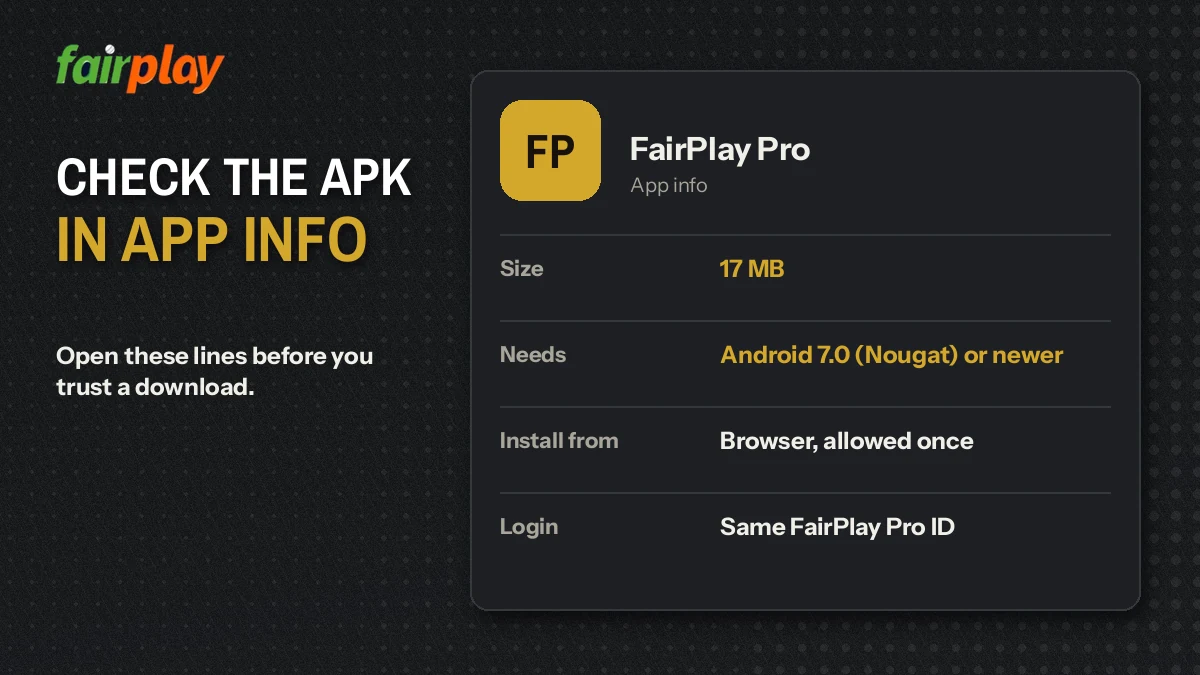
- Look at the file size. Open your Downloads folder before tapping anything. The FairPlay Pro APK should read close to 17 MB; if it says 300 KB, the transfer broke.
- Grant the single permission. The first tap on the APK pauses with a shortcut into Settings. Only the app holding the file at that moment needs the grant; nothing else on the handset gets it. Return with the back arrow and the FairPlay Pro installer is waiting.
- Install, open, sign in. The installer takes under a minute on most phones. The FairPlay Pro icon lands in the app drawer, and the first screen is the sign-in form shown above.
Step four is the one that confuses people, mainly becuase it looks different depending on the Android release. On Android 7 the control is a single global toggle named Unknown sources, buried under Security; from Android 8 onward Google moved it, and the permission is now granted per app, so you allow Chrome, say, but WhatsApp stays locked until you allow it separately. Same idea, different screen. If you went to Security on a newer phone and found nothing, that is why.
Nougat owners have more reason to flip that toggle of again afterwards. Their Unknown sources setting covers every app on the handset at once, whereas on 8 and later the grant stays tied to whichever app opened the FairPlay Pro file. The installed icon carries on working in both cases.
A word on APK mirror sites. Search results for this query mix in third-party listings carrying names close to Fairplay, and some of them look official enough. They are not files the FairPlay Pro desk issues, and from the listing alone you cannot tell which build, which publisher or which version you would be putting on your phone. Getting the file from the desk avoids that guesswork entirely (and the desk is awake at 3 a.m. too, which a mirror site is not, if something goes wrong).
Phone frame
FairPlay Pro on iPhone — Free Safari Shortcut Instead of an APK
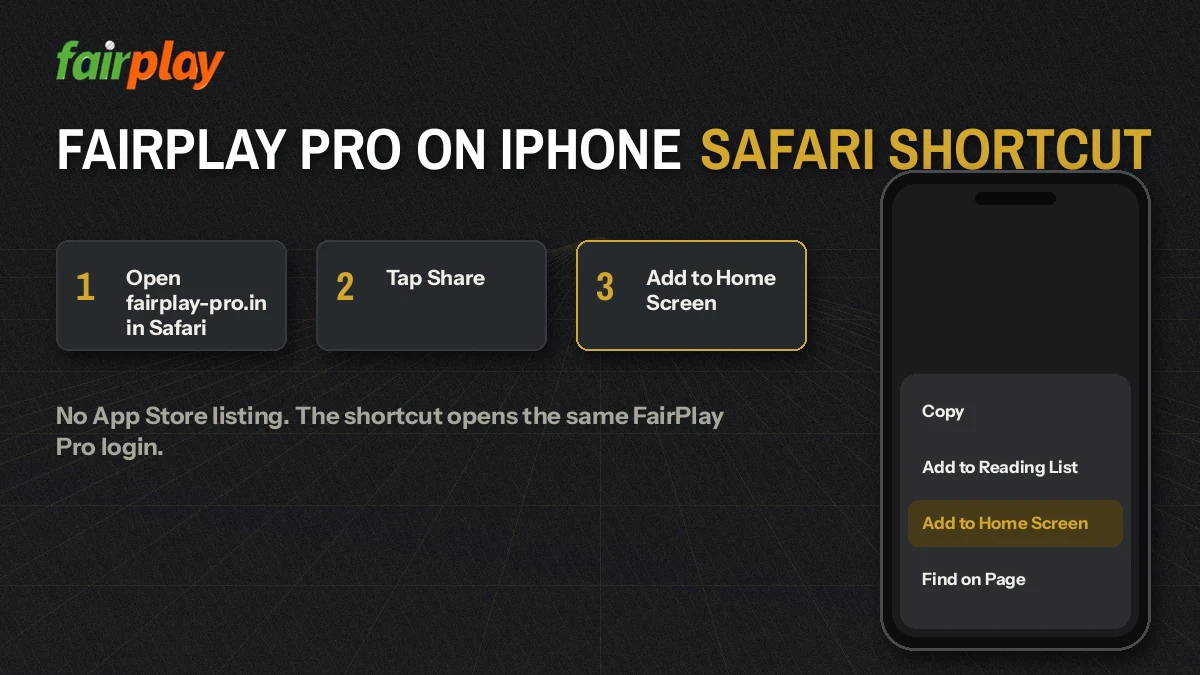
APK files are an Android format. iOS will not open them, full stop, so an iPhone gets no FairPlay Pro download in the usual sense. What it gets instead takes about thirty seconds:
- Open the working FairPlay Pro address in Safari (Chrome on iOS cannot pin shortcuts the same way).
- Tap the Share icon at the bottom of the screen.
- Scroll the sheet and choose Add to Home Screen.
- Keep the name FairPlay Pro, or shorten it, then tap Add.
The icon behaves like an app. It opens straight onto the lobby, your login carries over, and the balance is the same one you see on Android or a laptop. Why? Because the wallet sits on the account rather than on any device. Which address to pin is a separate question; the FairPlay Pro com address check lists what answered when it was last tested.
One small catch. If Safari has private browsing switched on, Add to Home Screen still works but the saved login does not stick, so you type it every single time. Turn private mode off before pinning.
People also search
FairPlay Pro APK Search Terms — Clear Answers in One Place
Website-style searches
fairplaypro com app download and fairplaypro com download
Both of these searches come from people who saw the fairplaypro.com address and expect a download button on it. The lobby there is a web page, so the FairPlay Pro build reaches you from the desk instead, as a file close to 17 MB that installs on Android 7 or newer.
Typing fairplay pro com download with spaces lands on the same answer: one APK, one permission, the same login you already use in the browser.
Build and version searches
fairplay pro apk and the latest version
A FairPlay Pro apk does not update itself, so anyone after the fairplay pro app download latest version follows three short moves:
- Open Settings, then Apps, then FairPlay Pro, and note the version at the bottom of App info.
- Ask the desk which build is current.
- If the numbers differ, install the new file over the old one without uninstalling.
FairPlay Pro APK Errors and Their Quick Fixes
Most failed installs come down to four messages. Each has a plain cause.
- There was a problem parsing the package
- Either the file is incomplete or the phone runs Android 6 or older. Check the size first; anything well under 17 MB means download it again. If the size is right, the version is the problem, and the browser route is your option.
- App not installed
- Usually an older FairPlay Pro build signed differently is still on the phone, so Android refuses to overwrite it. Uninstall the old icon, then install the new file. Your balance is untouched because it lives on the account.
- Blocked by Play Protect
- Play Protect flags apps it has not seen through Play Store. The screen offers More details and then an option to install anyway. That choice is yours; it is the standard prompt for any sideloaded file, not a sign of something specific to FairPlay Pro.
- Install button does nothing
- On some phones a floating chat bubble or a screen-dimming app draws over the installer and Android disables the button as a precaution. Close the overlay, tap Install again.
Picture the FairPlay Pro file arriving as a 17 MB document inside a WhatsApp chat on an Android 10 handset. Tapping it there makes WhatsApp the installing app, so the grant has to go to WhatsApp, and a grant given to Chrome months ago counts for nothing here. Move the same file into Files first and tap it from there? Then Files needs the grant instead. One file, three possible owners of the permission, and only the app holding it at the moment of the tap matters.
Storage catches people too. Android unpacks the file during install, so a 17 MB APK needs roughly double that free for a moment. Clear 40 MB and try again.
None of the four fits? The FairPlay Pro desk on WhatsApp is up 24x7. A screenshot of the error plus the Android version from About phone usually tells them which case you hit within a minute or two.
Keep the FairPlay Pro App on the Latest Version — Easy Monthly Check
Here is the trade-off with any sideloaded app: Play Store will never nudge you about a new FairPlay Pro build. That is the theory, anyway. In practice the old build usually keeps running for a while, so people only notice when a screen looks odd or a market fails to load. A quick check once a month is probably enough.
Updating is simpler then the first install. The permission you granted is still there if you left it on, and the new FairPlay Pro file goes straight over the old one, and Android keeps your saved username because the signature matches. If you turned the permission off afterwards, step four from the install rail applies again, for the same app that opens the file.
Inside the updated app nothing about the account changes. Sign-in still uses the username, password and sum check covered on the FairPlay Pro login page, and it takes about as long as on the website. Balance, statement and withdrawal requests sit under My FairPlay Pro, and the live tables, Aviator and Mines draw on that same wallet in the FairPlay Pro casino lobby. No second account, no separate app wallet, no transfer between the two.
FairPlay Pro App Download Questions — Straight, Verified Answers
Where can I get the FairPlay Pro app download?
Request it from the FairPlay Pro WhatsApp desk through the link on this page, and they share the current APK file for Android. Skip copies on APK mirror sites: apps with similar names turn up there, and nothing tells you which build or which publisher you are actually getting.
Is the FairPlay Pro APK safe to install?
Yes, the FairPlay Pro APK is safe to install if the desk sent it and it weighs close to 17 MB. Android shows a warning because the file did not come from Play Store, which happens with every sideloaded app. Delete any copy with a very different size, or one picked up from a mirror site.
Which Android version does the FairPlay Pro app need?
The FairPlay Pro app needs Android 7 (Nougat) or anything newer. Check it under Settings, then About phone, then Android version. On version 6 or older the installer usually stops with a parsing error, and in that case the browser address in Chrome is the practical way to play.
Is there a FairPlay Pro app for iPhone?
No, there is no FairPlay Pro app for iPhone, because iOS does not accept APK files. Open the FairPlay Pro address in Safari, tap Share, then Add to Home Screen. The icon opens the same site in a single tap, and your login, balance and bets stay identical.
How do I get the FairPlay Pro app download latest version?
Ask the desk for the current build and install it over the old one; Android keeps your settings when the new file is signed the same way. Sideloaded apps never update themselves through Play Store, so compare the version under App info with whatever the desk sends you.
How big is the FairPlay Pro APK file?
The FairPlay Pro APK is about 17 MB. Keep roughly 40 MB of free storage so Android has room to unpack it during the install. If the file in your Downloads folder shows only a few hundred KB or a couple of MB, the download broke halfway, so fetch it again.
How do I log in inside the FairPlay Pro app?
Inside the FairPlay Pro app you log in with the same username and password as the website, plus a small sum check such as 4 + 7. It takes around 20 seconds. One ID works on the app, in Safari and on desktop, so you never need a separate app account.